
Download Microsoft Word 2010 for Windows – A Classic Tool for Document Creation
Microsoft Word 2010 remains a cornerstone in the world of word processing, particularly for Windows users. Known for its intuitive interface and robust functionality, Word 2010 has cemented its place as a favorite among students, professionals, and businesses. While it is now considered a legacy application, it continues to meet the needs of users who appreciate its classic design and practical tools for document creation, formatting, and collaboration.
Top Recommended Alternative

Today, Microsoft Word 2010 is available through Microsoft 365, offering users the chance to download it alongside modern enhancements. By integrating Word 2010’s familiar features with cloud-based tools and real-time collaboration, Microsoft ensures that users can remain productive and connected in today’s digital workspace.
Why download Microsoft Word 2010 for Windows?
A Trusted Choice for Document Creation
Many people choose to download Microsoft Word 2010 for Windows for its flexibility and ease of creating professional-looking documents. Whether you’re preparing a business proposal, writing an academic paper, or drafting a personal letter, Word 2010 provides all the essential tools you need in one place.
It comes with a variety of customizable templates and styles, along with advanced formatting options that let you adjust fonts, layouts, and bullet points to suit your needs. The Find and Replace feature also makes editing faster and more efficient. For longer documents, the Navigation Pane helps you organize headings and quickly move between sections, making the entire writing process smoother and more manageable.
Collaboration made simple
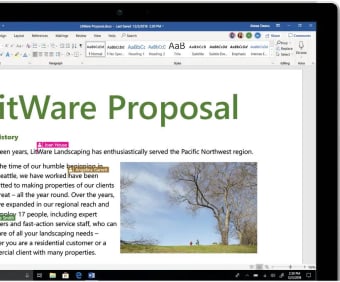
Collaboration is another compelling reason to download Microsoft Word 2010 for Windows. Its built-in features, such as Track Changes and Comments, allow multiple users to review and edit documents simultaneously. These tools make it easy to provide feedback, manage revisions, and maintain version control.
With Microsoft 365 integration, collaboration becomes even more seamless. Documents stored on OneDrive can be shared and edited in real time, allowing team members to work together efficiently, regardless of their location. This feature is particularly beneficial in remote or hybrid work environments where real-time collaboration is essential.
Key features of Microsoft Word 2010
Built-in templates and SmartArt
By downloading Microsoft Word 2010 for Windows, users can take advantage of a large collection of ready-made templates created for different needs. Whether you’re putting together a resume, drafting a business report, or creating a formal document, these templates help you save time while maintaining a polished and professional look. You can easily personalize them by adding your own logo, adjusting the layout, or choosing colors that match your style or brand.
Another impressive feature is SmartArt, which lets you create clear and visually engaging graphics, such as flowcharts, organizational charts, and timelines. It’s especially useful for projects that require a strong visual presentation, helping you communicate ideas more effectively.
Integration with Microsoft 365
Downloading Microsoft Word 2010 as part of Microsoft 365 provides access to additional productivity-enhancing tools. OneDrive integration ensures secure cloud storage, allowing users to access and edit their files from any compatible device. This integration also supports real-time sharing, making collaboration simple and efficient.
For those working in teams, the connection with Microsoft Teams enables seamless communication while editing shared documents. These integrations combine the best of Word 2010’s functionality with modern tools that support today’s fast-paced workflows.
Performance and usability
Microsoft Word 2010 is optimized for Windows, ensuring reliable performance across a variety of devices. The software is known for its stability, making it a dependable choice for users who value smooth functionality. Its low system requirements also mean that users with older hardware can still enjoy an excellent word-processing experience.
Minimum System Requirements:
- Processor: 500 MHz or faster.
- Memory: 256 MB of RAM (512 MB recommended).
- Hard Disk Space: 3 GB available.
- Graphics: DirectX 9.0c-compatible with 64 MB or higher.
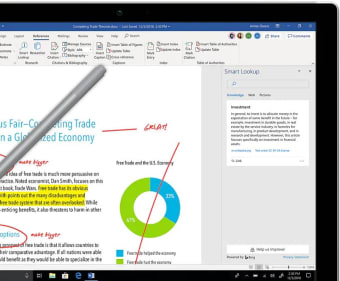
The user-friendly interface of Word 2010 further enhances its appeal. The Ribbon Toolbar, introduced in earlier versions, organizes functions into clear categories, such as Home, Insert, and Page Layout. This structure makes it easy for both novice and experienced users to find the tools they need.
Advanced Tools for Document Creation
Editing Features
One of the biggest advantages of Word 2010 is its powerful editing capabilities. It allows users to enhance their documents with text effects, customize line spacing, and add watermarks for branding or confidentiality purposes. The Find and Replace feature makes updating content quick and effortless, which is especially helpful when working with lengthy or detailed documents. These tools make editing more efficient and help create polished, professional results.
Design and Customization
For users who care about design and presentation, Word 2010 provides simple yet effective customization tools. You can easily create headers and footers, insert tables, and add charts to organize information clearly and attractively. These features help ensure that your documents are not only informative but also visually polished. Because of this balance between function and design, Word 2010 works well for both professional tasks and personal projects.
Why Microsoft 365 is the best way to access Word 2010
If you’re considering downloading Microsoft Word 2010 for Windows, the Microsoft 365 suite is the best option. By accessing Word through this platform, users benefit from regular updates, advanced security features, and seamless integration with other productivity tools.
Microsoft 365 includes essential applications such as Excel, PowerPoint, and Outlook, creating an all-in-one productivity ecosystem. For Word 2010 enthusiasts, this ensures a familiar experience enhanced with modern tools like cloud storage and real-time collaboration.
Downloading Microsoft Word 2010 for Windows is an excellent choice for users who value its classic features and reliable performance. Whether you’re creating documents for work, school, or personal projects, Word 2010 provides a robust set of tools that meet diverse needs.
By accessing Word through Microsoft 365, you can enjoy the best of both worlds: the trusted functionality of Word 2010 combined with modern enhancements like cloud-based access and integration with other productivity tools. This ensures that users can remain productive and connected, whether working independently or as part of a team.
For those seeking a dependable and versatile word processor, downloading Microsoft Word 2010 for Windows remains a timeless and practical choice.